
Change Log in Projects: How a Good Change Log Brings Order to Change Chaos
A well-kept change log turns a flood of change requests into a process you can plan. At any moment you can see which changes are open, how they affect budget and schedule, and which decisions have already been made – internally and externally.
In this article you'll learn, step by step, how to build a change log that holds every thread together, from the first idea through commercial approval to the release. You can combine classic project management with agile development and a clean change management process – and we'll show you how to involve internal and external customers transparently.
1. What Is a Change Log, and Why Does Every Project Need One?
At its core, a change log is nothing mysterious: it's a structured record of every significant change to a project. In it, you capture:
- which changes stakeholders request
- how you assess effort, risk and scope
- which decision-makers approve budget and schedule
- when you actually ship a release
So you're not just keeping a list of changes, but a traceable history in which anyone can see:
- What has changed since the last version?
- Who triggered the change, and who approved it?
- Which version of the product or project delivers which features?
A change log protects you from familiar problems:
- "That was included in the quote, surely."
- "We never discussed extra costs."
- "Why has the deadline slipped again?"
With a clean change log, you move these discussions away from gut feeling and onto clear, documented facts.
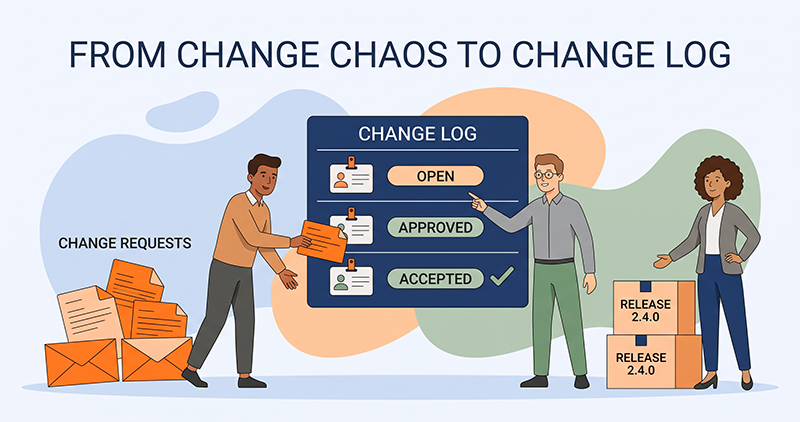
2. The Complete Change Request Process: From Customer Request to Change Log in 7 Steps
The graphic sums it up nicely. Ideally, you steer every change through seven clear steps, whether an external customer, an internal department or a steering committee is in the lead.
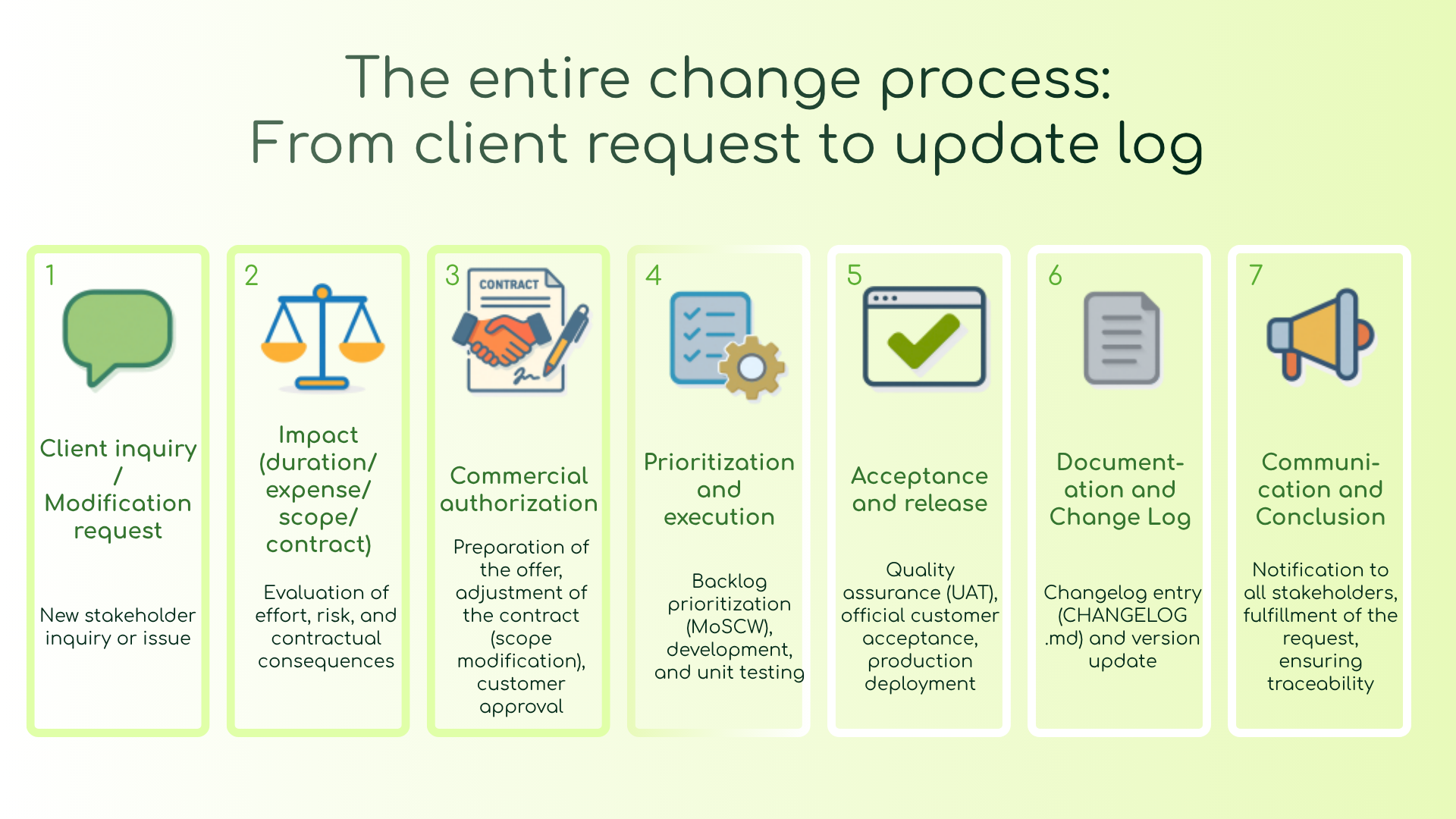
Step 1: Customer Request / Change Request
Everything starts with a wish or a problem, usually coming from:
- external customers
- internal departments
- project stakeholders
They get in touch with a request: a new feature, an extra report, a change to the construction plan, different campaign logic. You capture every request straight away:
- date
- requester
- short description
- reference to the contract, work package or ticket
That way every change officially lands in the log, not just in an email.
Step 2: Effort → Impact (Time / Cost / Scope / Contract)
Next, you assess the impact:
- Time: do milestones move, does the timeline get longer?
- Cost: how many hours and how much external spend does it add?
- Scope/contract: does the scope of work grow, or does the change simply replace something that already exists?
Internal teams, customers and steering committees play a central role here. They need to understand exactly:
- How does this request change the budget?
- Which other projects suffer if you shift capacity?
You record this assessment in the change log. Short, clear and traceable.
Step 3: Commercial Approval
Now comes the commercial side:
- Do you need to issue a quote or a change order?
- Does the contract need amending (scope change, payment schedule, term)?
- Can the budget come from an existing pot, or is new budget needed?
Depending on the project structure, the decision lies with:
- the external customer
- whoever owns the internal budget
- a steering committee
Only once that body gives its consent do you mark the change as approved in the change log. Without that "go", nothing moves into implementation.
Step 4: Prioritization & Implementation
With commercial approval, the project shifts from "we're developing an idea" to "we're delivering it step by step". Now it's about bringing structure to the work without losing sight of the bigger picture.
It helps to put the backlog in order first:
- Prioritizing with MoSCoW (Must, Should, Could, Won't) or a similar method makes it clear which items really come first.
- Breaking the work down into concrete tasks, user stories or work packages makes it easier for everyone involved to understand their role and take ownership.
- Depending on the type of project, development, configuration or operational delivery can then begin – in a software project, a process change or a campaign, for example.
In an agile setup, it pays not just to inform the customer but to involve them actively:
- In refinement, you can sharpen requirements together and address uncertainty early.
- In sprint planning, you build a shared understanding of what's realistically achievable – and genuinely worthwhile – in the next cycle.
- In reviews, the team shows tangible results, gathers feedback and can plan next steps on firmer ground.
This creates a working rhythm that has proved itself: prioritize, break down into manageable pieces, deliver, demo, learn – until the concept becomes a result that really works in the customer's day-to-day.
That way there are no surprises at acceptance. The Definition of Done spells out exactly when a change counts as "done". In the change log you link to the relevant tickets, repos or documents rather than writing every detail out again.
Step 5: Acceptance & Release
Now comes the question: "Have we delivered what we agreed together?"
With external customers, this might involve (depending on what the contract says):
- user acceptance testing (UAT)
- formal acceptance
- deployment to production or go-live of the result
Internal assignments work much the same way, just often less formally. What still matters:
- The client confirms the change is right as delivered.
- You use the Definition of Done as a measurable basis: are the criteria met, is the quality OK, are there no open blockers, and so on.
If you work with versioning, you assign the change to a release. A release bundles several changes; the change log shows which features and fixes are in which release.
Step 6: Documentation & Change Log
Now you update your change log:
- status set to "accepted" or "closed"
- release date
- a short reference to tests, acceptance or go-live
In software development, you'll often use a CHANGELOG.md file in the repository. There, the changelog file describes:
- new features
- changed functionality
- fixed bugs
- removed functionality
In other projects you keep this history on a central page, in a wiki or in your project tool. What matters: you keep exactly ONE reliable change log that everyone can see.
Step 7: Communication & Close-out
Finally, you inform every affected stakeholder:
- "Change Request #47 has been accepted, budget is covered by change order 3, go-live from next week."
- "The new feature for the internal department is live, documentation is in the wiki, training follows next week."
You do this through:
- email distribution lists
- release notes
- internal news posts
- or updates directly in the tool
The close-out goes into the change log as well. Anyone can see that the change has moved cleanly through the process, from the first request all the way to communication.
3. How Is a Change Log Different from Emails, Minutes and Logs?
You might be thinking: "We already take meeting minutes and have tickets. Isn't that enough?"
The answer is usually a clear no.
Emails, notes and individual logs each do a job, but none of them gives you the full picture. They scatter a list of many sub-tasks across many places. A change log, by contrast, brings together:
- impact assessment
- commercial approval
- implementation, acceptance, release
- communication
One look at the change log is all you need – not ten searches through inboxes, files and tools. That's exactly the clarity many teams gain straight away once they start keeping a change log consistently.
4. What Belongs in Every Change Log: Structure and Fields
To keep your change log quick to maintain day to day, you set up a lean structure. These fields have proved their worth:
- ID: a unique number
- date of the request
- requester (internal/external)
- short description of the change
- impact (time/cost/scope/contract)
- decision-maker (e.g. steering committee, department, customer)
- approval date and reference to the quote/change order
- release / milestone
- status (open, in progress, accepted, closed)
- links to tickets, Git, GitHub, documentation
Whether you keep this change log in a Markdown file, in Excel or directly in your project tool is up to you. What matters is that everyone looks at the same page, not several.
5. Change Logs in Software Development: From Git Log to Readable Releases
In software development, the question almost always comes up: "Isn't the Git log enough?"
You know the answer: the Git log lists commits, but those commits are written for developers. That's where you'll find:
- merge info
- small fixes
- experimental changes
To stakeholders, a log like that looks more like a data stream than an overview of the changes that matter.
That's why professional teams separate:
- the technical level (Git, commits, branches)
- the management level (change log with releases, features, fixes)
Many open-source projects rely on a standardized changelog. They write it in Markdown and keep it right next to the README. Keep a Changelog shows what that structure looks like: you use categories such as "Added", "Changed", "Fixed" and "Removed", and assign every change to a version using semantic versioning (SemVer).
In short: SemVer uses the scheme MAJOR.MINOR.PATCH, e.g. 2.3.1:
- MAJOR: big, backwards-incompatible changes (
1.x.x→2.0.0) - MINOR: new functionality that stays compatible (
2.3.x→2.4.0) - PATCH: bug fixes only (
2.3.1→2.3.2)
That way users can see at a glance whether to expect new features, just bug fixes or bigger changes.
The GNU Coding Standards back up this practice. They explain why a separate change log matters, so that releases and changes stay traceable later on.
Your best move is to adopt these principles and adapt them to your own project management, whether or not code is involved.
6. Change Logs for "Classic" Projects: Construction, Marketing, Organization
A change log isn't only useful in software development. You can apply the same logic to any project where requirements change.
Construction project
- The client wants extra sockets, new doors, a different façade.
- You record every change in the change log, calculate the extra costs and schedule impact, and have the client approve them.
- You link the entries to change orders and acceptance records.
Marketing campaign
- Management wants additional channels and landing pages.
- You assess which parts of the campaign can be dropped to free up budget and capacity – extra costs still arise.
- The change log shows why the campaign budget ends up higher than in the original quote.
Organizational and consulting projects
- Departments gradually bring in new requests: extra workshops, more stakeholders, new reports.
- The steering committee sees in the change log how scope and budget evolve piece by piece.
- You present not just the latest status, but the complete history of changes.
The result is a change log that supports any kind of project cleanly.
7. Outcome-Oriented Entries: How Your Change Log Improves Communication
Many change logs only describe what has changed:
- "New field in the form"
- "Report edited"
- "Process step removed"
An entry lands much better with stakeholders when you briefly explain why you're doing something:
- "New field in the form, so sales can record the contact channel properly and you can analyse campaigns more precisely later."
- "Report extended, so the steering committee can see budget consumption per project at a glance."
- "Process step removed, to avoid duplicate data entry in the CRM and cut processing time."
That small "why" makes the change log readable for management, internal customers and external partners. You're telling the story of your project, not just listing technical details.
8. Working with External Partners: How procoli Mini Strengthens Your Change Log
With external partners in particular, change requests often arrive via email or a mix of tools. Without a central change log, things slip through the cracks fast.
This is where procoli Mini helps:
- You bring external partners into your process through link-based tasks. They work straight from an email, without needing their own login.
- A construction engineer, for example, hands out tasks to roofing, door or electrical contractors. Each contractor receives an email with a link to the task, sees the context there and uploads documents directly.
- In the interactive web view, discussions, file uploads and status changes all come together in one place.
For your change log, that means:
- You can see in the task history which changes external partners triggered.
- You carry the relevant changes over into the central change log and link them to quotes, contracts and releases.
- You keep changes to a project traceable, even when many external stakeholders are involved.
In the longer term, procoli is building a platform that connects different management tools. Every team member can then choose freely whether to work directly in the tool or stay in the system they know. A cloud infrastructure keeps everyone's preferred systems in sync in the background. Your change log ties all these streams together into one clear, readable history. If you want to bring external partners' change requests together in one place, join the procoli waiting list now and secure early access.
9. Practical Tips: How to Keep Your Change Log Up to Date
Finally, some concrete tips from practice:
- Assign a responsible role.
In many projects, the project lead owns the change log. That role makes sure no request "slips through". - Keep the entry barrier low.
Start with a simple file, a central page or your project tool. You can adapt the structure later as the project grows. - Anchor the change log in your meetings.
In the weekly, the sprint review or the steering committee, look at the change log together: new requests, pending approvals, completed changes. - Record every change promptly.
Don't wait for a "convenient moment". Ideally, log changes on the same day you discuss them. - Work with clear IDs and versioning.
Use unique IDs and SemVer-style versions for larger releases. That way you can link changes to communication, invoices and reporting. - Use established guidelines.
Take inspiration from resources like Keep a Changelog and the GNU recommendations. You don't have to adopt every guideline word for word, but you'll benefit from the experience of many projects.
Key Points to Remember
- A change log is your central record of changes to a project – from customer request to close-out.
- The 7-step change request process guides you through impact assessment, commercial approval, implementation, acceptance, documentation and communication.
- Internal customers and steering committees make deliberate decisions about budget and schedule; the change log makes those decisions visible.
- In agile environments, you involve customers regularly and work with a clear Definition of Done, so acceptance happens without surprises.
- You separate technical logs (Git, commits) from a readable change log that explains releases and features to every stakeholder.
- In construction, marketing or organizational projects, a change log adds just as much value as in software development.
- Outcome-oriented entries always explain why you're making a change and what benefit it brings.
- procoli Mini supports you by bringing external partners into tasks via a link and keeping all discussions, files and updates visible in one place.
- With a clear structure, defined responsibilities and simple guidelines, your change communication gets noticeably better – and discussions about budget, scope and deadlines become far more relaxed.
Q&A on Change Logs
What is a change log in project management?
A change log is a central record of changes. In it you capture which changes stakeholders request, how you assess their impact on time, budget, scope and contract, which body (customer, department, steering committee) approves them, and how you close out implementation, acceptance and release.
Why aren't regular meeting minutes or an email trail enough?
Minutes and logs capture individual moments. A change log connects every step of a change into one continuous history: request, impact, approval, implementation, acceptance and communication. What you read there is a list of changes with clear context, not scattered bullet points.
How do I connect change logs with Git?
You use Git for the technical details (commits, branches, pull requests (PRs)). In the change log you reference the relevant changes per release in plain language. You link to issues or PRs, but you word the entries so that non-developers can understand them too.
How do I involve internal customers and steering committees properly?
You record every request in the change log, whether internal or external. In the impact assessment you explain how the change affects budget and schedule. Internal customers or the steering committee then approve the changes. You document the decision-maker, date and budget adjustment directly in the change log.
What role does agile development play in the change management process?
Agile development keeps customers closely involved. In refinements, plannings and reviews you see together how the change takes shape. The Definition of Done makes clear when a change counts as finished. Your change log reflects this process: you link releases to sprints and record acceptances cleanly.
How do I structure a changelog file in practice?
You define fields for ID, date, requester, short description, impact, decision-maker, approval date, release and status. You keep this structure in a Markdown file, a wiki or your project tool. What matters is a consistent structure, not the specific tool.
Which standards and sources make good references?
Very helpful are Keep a Changelog, with clear guidelines for changelogs in projects, and the GNU Coding Standards – Change Logs. Both show how professional projects structure and maintain a changelog.
How do I document changes triggered by external partners?
You use a system like procoli Mini to hand out tasks via links. External partners discuss changes directly in the web view, upload files and give feedback. You carry the most important changes from that history over into your change log and link them to contracts and releases.
How do I handle mistakes or typos in the change log?
You correct typos straight away. If you change content, you add a short note on what changed. That keeps the history credible, even when several authors maintain the same change log over a long period.
How do I get started if I don't use a change log yet?
Pick a current project, create a simple file or page, and from today capture every new change using the 7-step process. Only backfill older changes if they're genuinely critical. Build a routine into your meetings and adjust the structure and level of detail over time.