
(WBS) Work Breakdown Structure: Example & Pro-Tips
Do you want to clearly structure your project outline from the start, keep a firm grip on the scope, and avoid stumbling around in the dark during planning and execution? That's exactly what a Work Breakdown Structure (or WBS) is for. In this article, you will get practical guidance, real-world pro-tips, and a clear WBS example. You will learn how to create your work breakdown structure, how the hierarchy works, and how to instantly bring order to chaos using coding and WBS codes. By the end, you'll have a solid work breakdown structure template in mind that you can quickly and easily adapt to your own project.
What is a Work Breakdown Structure (WBS) and Why Does It Save Your Project Management?
A Work Breakdown Structure is the complete, hierarchical representation of all tasks within a project—sorted not chronologically, but by content and deliverables. You break your entire project down into logical components, leaving you with an outline that reads much like the table of contents of a book.
The major benefit: You map out the project structure before getting lost in individual, disjointed tasks. You structure the scope of work rather than just accumulating to-dos. This builds the foundation for all subsequent steps: effort estimation, schedules, responsibilities, risk management, and team alignment. A tool like Procoli helps you build this hierarchy digitally and collaboratively from day one, without getting bogged down in messy spreadsheets. A good work breakdown structure prevents "invisible work" from surfacing later—work that no one had accounted for.
And yes, a WBS might sound a bit dry—until you've used it on complex projects. Once you do, you'll never want to work without one again.
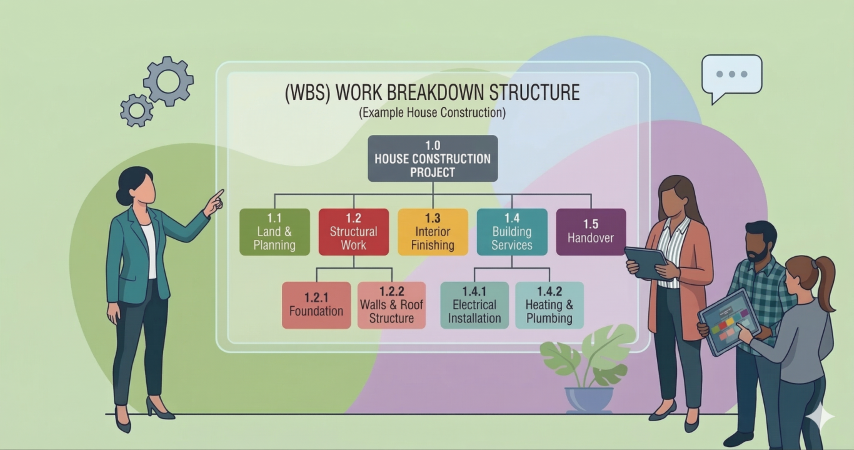
How to Recognize a High-Quality Work Breakdown Structure
A strong work breakdown structure offers a clear project outline and ensures you maintain the overview, even when multiple team members are working on a subtask simultaneously. You can see at a glance what belongs to the project and what doesn't. Establishing these boundaries early on based on clear structuring principles will save you from endless debates later.
Look for these characteristics: The WBS must remain deliverable-oriented, not activity-obsessed. Every element represents a deliverable or a clearly definable result. You don't write "Hold meeting," but rather "Concept approved." This turns your project structure into a true steering tool for project management.
And another pro-tip: Check for completeness by asking, "Can I deliver the entire final product with this?" rather than "Do I have enough tasks?" This way, you avoid gaps that otherwise only become apparent right before the deadline.
Creating a Work Breakdown Structure: How to Work Top-Down Without Gaps
When you want to create a WBS, start at the top: first the final deliverable, then sub-areas, and then drill down further. This method of structuring seems simple, yet many fail at dividing things cleanly. Therefore, proceed in three steps:
First: Define the "What." What delivery counts as success? This forms your "root" element. Second: Divide it into 3 to 7 large blocks, often acting as sub-projects or main deliverables. Third: Break these blocks down into subtasks and work packages until you reach true, actionable manageability.
Important: Do not use the WBS as a schedule. Timing comes later. The WBS maps the structure, not the chronological sequence. This stops you from getting lost in date battles early on, instead forcing you to create clarity regarding the project's content.
Keep this core principle in mind: Creating a work breakdown structure means maintaining an overview of the entire project outline and structuring the scope so you can later measure, assign, and approve it.
WBS Hierarchy: Which Structure and Level Fit Your Project?
The layout of a work breakdown structure follows a hierarchy across several levels. You decide how deep to go. In small endeavors, 3 levels are often sufficient. In larger projects, you need more, but you should stop as soon as you can cleanly distinguish true work packages.
Typically, the work breakdown structure is displayed as a tree diagram. This visual representation is helpful because your brain grasps relationships faster this way than in plain tables. Nevertheless, you can also map the WBS in a table, as long as the hierarchy remains clear. The central rule stays the same: Every element must hang unambiguously beneath a single parent element.
Pro-Tip on Structuring Levels
Establish a clear project structure level from which you will assign ownership and responsibility. This prevents micromanagement while giving your project team enough orientation.
Structuring Work Packages: Defining Deliverables Empowering Your Team
Now let's get practical. You need work packages that can be estimated, implemented, and accepted. A work package is not merely a collection of individual tasks; it is a clear building block of a deliverable. You want to design a work package so that a single responsible person can deliver it within a manageable timeframe.
In many project outlines, you'll see the lowest level defined as the "Work Package Level." This is where you place items like "Landing page copy finalized," "Tracking concept approved," or "Design system created." You apply a clear definition here: Output, quality criteria, acceptance rules. Doing so keeps the project work from descending into chaos.
If you define work packages too broadly, transparency disappears. Alternatively, if you subdivide work packages until they are too small, you drown in a sea of confusing micro-tasks. Keep the balance. Remember the rule: "Break down the work packages until coordination and outcome are secure, but no further."
Function-Oriented or Object-Oriented: Which Structuring Approach Fits Best?
When choosing a structuring principle, you have two classics: function-oriented or object-oriented. With the function-oriented approach, you group by types of activity, such as analysis, concept, implementation, and quality assurance. With object-oriented structuring, you organize by deliverables, for instance: website, campaign, CRM, content hub.
Choosing between function-oriented and object-oriented dictates clarity. The object-oriented approach works wonders when you have tangible deliverables. The function-oriented setup is suitable when processes dominate or teams are organized rigidly by functional silos. Many projects use a hybrid form because reality rarely fits neatly into just one box.
My practical view: If you have several sub-projects running in parallel, object-oriented usually provides a better overview. If you need to steer strongly by process, function-oriented helps. The main thing is that you stay consistent within any given work package; otherwise, your hierarchy levels will collide.
Phased Approach & Project Phases: When Does Chronological Structuring Pay Off?
Sometimes you may want to structure chronologically, adopting a phased approach: Initiation, Planning, Execution, Closure. It sounds logical, but there's a trap waiting here: You might accidentally build half a schedule into the WBS.
Use project phases in the WBS when you have strict gate decisions: "Concept approved," "Budget confirmed," "Go-Live." In this scenario, this structure gives you clear decision points. You still keep the WBS deliverable-oriented: Every phase has specific deliverables.
However, if you merely use phases as "calendar sections," the WBS loses its power. You end up building a filing system rather than a steering framework. Keep the work breakdown structure clean as a scope model. The sequence and timeline should be managed afterward as the chronological sequence of the project; a Gantt Chart is particularly well-suited for this.
WBS Codes, Coding, and Numbering: Making Elements Unambiguous
As your project grows, you'll need clear coding. This is where the WBS code comes into play. You assign numbers like 1.0, 1.1, 1.1.1. Every node in the work breakdown structure receives a unique key. It sounds trivial, but it's pure gold for communication.
Through coding in the WBS, you ensure that everyone on the project team references the exact same element. You avoid misunderstandings like, "Are you referring to the concept or the final text?" Furthermore, you can cleanly link these codes across tools and tables to cost centers, risks, or approvals.
Feel free to call it the WBS Code. And when you write reports later, these WBS codes act as anchors. You map status, effort, and dependencies cleanly. You can even use WBS codes in filenames if you really want rigorous organization.
Agile and the WBS: How Does a Work Breakdown Structure Fit Sprints, Backlogs, and Flow?
Many believe that agile and the WBS do not mix. In practice, they complement each other perfectly. The project outline (WBS) defines the scope and deliverables. Your backlog organizes the execution. This allows you to retain an overview, even as you deliver iteratively.
You use the WBS as a deliverable map: What elements need to be complete at the end? You then derive Epics or Themes from this. These, in turn, spawn User Stories. The WBS remains stable, while your backlog stays flexible. This grants you control without rigidity.
Here, the term 'breakdown' fits perfectly: You break down the required outcome (WBS), and then you break down the implementation steps (Backlog). The work breakdown structure supplies the framework; your agile setup supplies the cadence.
And if you use tools: In MS Project or other systems, you can map WBS structures without slowing down agile workflows. You separate "What are we delivering?" cleanly from "How are we planning the current sprint?".
The Procoli Workflow
This is where Procoli shines. You set up your project using the WBS mode with clear hierarchical levels. Simultaneously, you create your sprint backlog for operational execution. The trick: You link the tasks from your stable WBS directly into your current sprint.
What this means for your team:
Synchronization without chaos: If someone works on a task during the sprint or adds comments, this updates in real time within the respective WBS element.
Protecting the structure: Your overarching project outline remains clean and easy to read, while the high-speed work hums along in the sprint.
Transparency: You instantly see progress in the WBS without the hierarchical order being "destroyed" by hundreds of micro sprint-tasks.
The Work Breakdown Structure in Practice: House Construction WBS Example
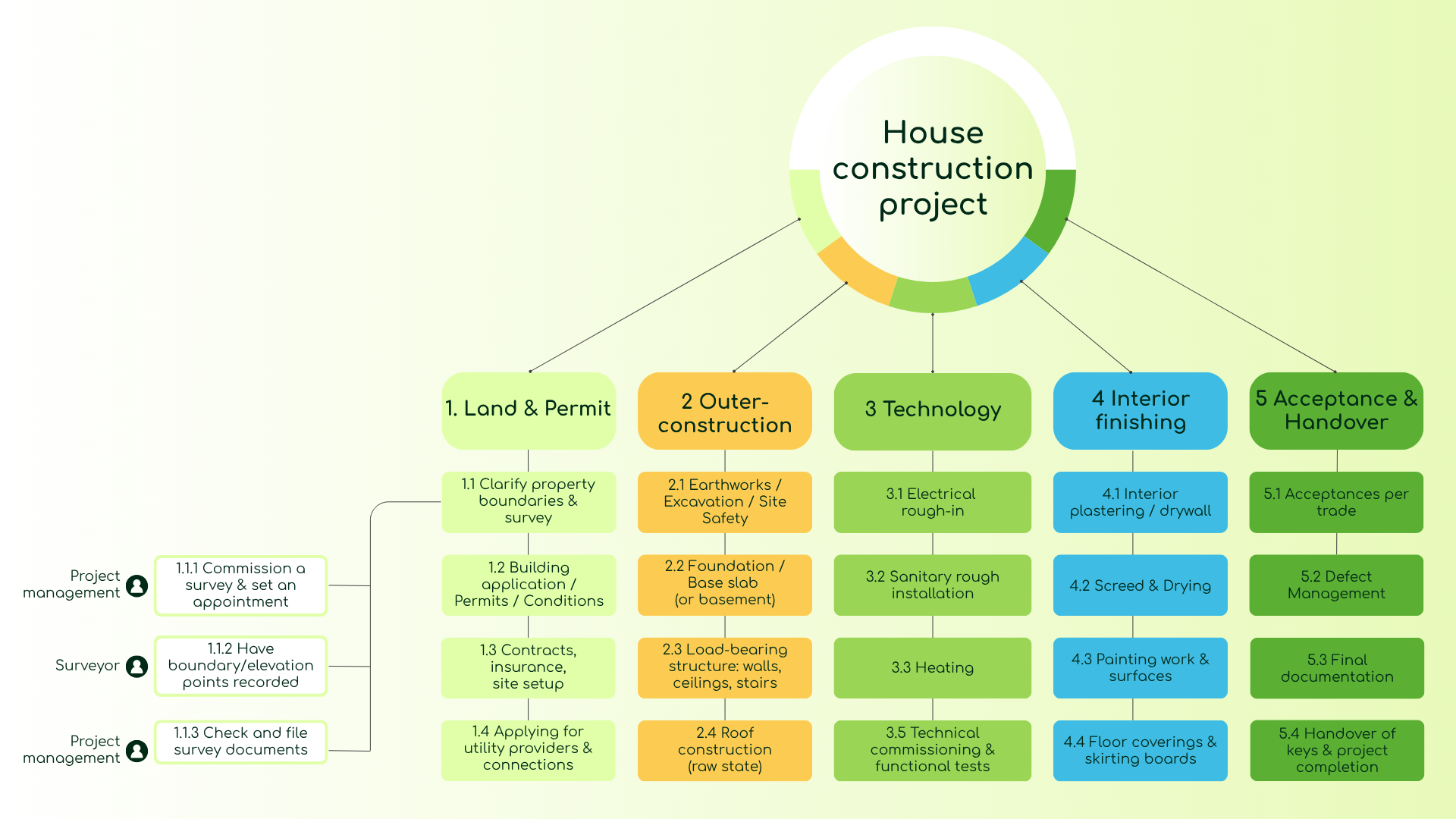
Let's look at an illustrative wbs example: Building a house. You want to hand over a finished house. Your WBS starts at the top with "House completed." Beneath that, you structure object-oriented deliverables:
- Land & Permit
- Exterior Work
- Technology (Electrical, Heating, Sanitary)
- Interior Finishing
- Acceptance & Handover
Then you go deeper and define the work package level. Under Exterior Work, you might place a work package like "Basement ceiling concreted, including inspection." Under Technology, you place "Electrical installation completed." You can see: You structure based on outcomes, not by individual isolated chores.
You can use this work breakdown structure template as a shared framework in collaboration with external partners. The team delivers the work packages along this structure, saving you from having to coordinate everything yourself every single day. This removes a heavy load off project management and ensures clean project execution. Procoli will become your best friend for boundaryless collaboration, offering link-sharing without logging in, all packed in an interface that simply makes sense.
In concrete terms: You can build a WBS baseline for yourself by defining 5 to 7 main areas, adding 3 to 7 elements per area, and only then defining the work packages. This way, you work quickly and simply, but never superficially.
The Most Important Points at a Glance
- A Work Breakdown Structure (WBS) maps the scope of a project as a deliverable-oriented project outline.
- Start top-down, define sub-areas, and then slice out clear work packages.
- A solid WBS delivers an immediate overview and prevents scope gaps.
- The layout of the WBS follows clear hierarchy levels, often visualized as a tree diagram.
- Choose a structuring principle: function-oriented, object-oriented, or a hybrid, but stay consistent within packages.
- Use WBS codes and numbering to ensure every element remains unambiguous for clean communication.
- Agile and the WBS are complementary: The WBS handles the scope, while the backlog handles the execution.
- Transfer the "Building a house" WBS example to your project, and your structure will sit perfectly.
- If you lack expertise: WeValCo is ready to consult you on your project management tracking.
Frequently Asked Questions
What is the difference between a Work Breakdown Structure (WBS) and a Gantt Chart?
A work breakdown structure organizes the project scope hierarchically by outcome, without reference to time. A Gantt Chart plots tasks on a timeline. The WBS comes first—you derive the sequence from it, and ultimately create the Gantt.
How many hierarchical levels does a work breakdown structure need?
That depends entirely on the size of the project. For small efforts, 3 levels usually suffice. In larger projects, you naturally need more, but you should stop drilling down as soon as you can distinctly separate functional work packages.
When should I use function-oriented vs. object-oriented?
Object-oriented fits best when you have tangible deliverables. Function-oriented works best when processes determine the pace or teams are structured rigorously by functions. Many real-world projects sensibly use a mixed format.
What is a WBS Code and why do I need it?
A WBS Code is a unique numbering system (e.g., 1.0, 1.1, 1.1.1) for each element in the project outline. It ensures everyone on the team references the identical item and allows smooth integration with schedules, cost centers, and risk logs.
Does a work breakdown structure fit into an agile working environment?
Yes. The WBS sets the scope and deliverables as a stable outcome map. The backlog flexibly organizes the implementation phase. WBS and backlog complement one another: The WBS brings stability, and the backlog brings agility.
How granular should a work package be?
Granular enough that a single responsible individual can deliver it in a reasonable timeframe with a clear output, distinct quality criteria, and acceptance rules. Not too large (losing transparency), and not too minute (drowning in trivial tasks).
Conclusion – The Key Takeaways You Need to Remember
- A Work Breakdown Structure (WBS) is the foundation of structured project management: It defines the scope as a clear deliverable map.
- Create it top-down, pick the right structuring approach, and define clean work packages.
- WBS codes and numeric coding ensure precise communication across the project team.
- Agile and WBS are not mutually exclusive—use your WBS for scope and your backlog for tasks.
- The "Building a house" WBS example demonstrates what a work breakdown structure template looks like in practice and how you can adapt it to supercharge your next project outline.
Sources & Expert Links
- PMI – Project Management Standards: https://www.pmi.org
- Wikipedia – Work Breakdown Structure: https://en.wikipedia.org/wiki/Work_breakdown_structure