
RAID Log in Project Management: Overview, Template and Example for Your Project Status
It's Friday afternoon, the status meeting has just wrapped up, and only now does someone mention in passing that the agency will deliver the designs for the new website two weeks late. The information had been sitting in an email for days. Nobody had connected it to the schedule.
A RAID log stops exactly this kind of surprise. It's a single, central list in which your project team keeps track of four things: risks, assumptions, current issues and dependencies. Every entry gets an owner, a rating and a next step, so you can see the real state of the project at a glance instead of piecing it together from inboxes.
In this article, you'll learn what the four letters stand for, how to build a RAID log step by step, which columns it needs and the mistakes that sink most logs. We'll follow one project throughout, the kind almost every project manager has run at some point: relaunching the company website with an external agency, an IT service provider and several departments.
What is a RAID log?
A RAID log is a project document that brings risks, assumptions, issues and dependencies together in one place. It replaces scattered notes, emails and chat threads with a shared overview that the whole team knows and maintains. Anyone who wants to know where a project stands, and what could put it at risk, looks there first.
Atlassian sums the idea up in one sentence: "A RAID log is a project management tool that tracks risks, assumptions, issues, and dependencies in one place." (Atlassian: RAID Log Explained) That's also why it has become one of the classic project management tools. You don't need special software or lengthy training, just the discipline to write down the factors that matter, consistently.
The letters don't mean the same thing everywhere, though. The Project Management Office at the University of Waterloo, for example, uses a template in which RAID stands for risks, actions, issues and decisions (University of Waterloo: RAID Log). Which version you choose matters less than whether your whole team speaks the same language. This article covers the most common reading, with assumptions and dependencies.
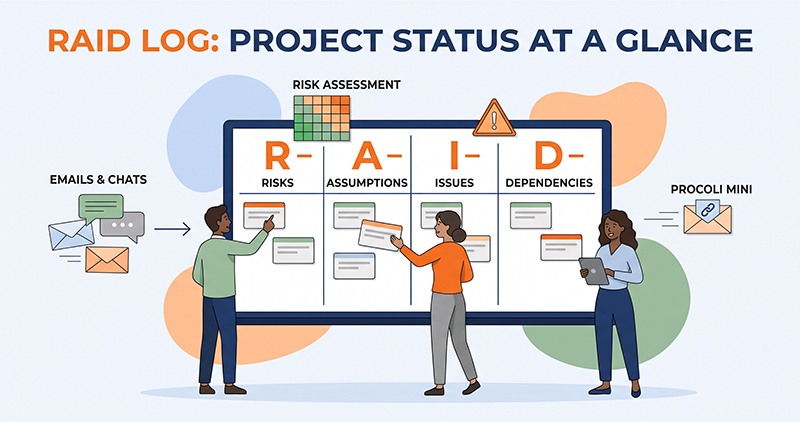
What does RAID stand for? Risks, assumptions, issues and dependencies at a glance
RAID is an acronym made up of four terms. Each letter answers a different question about your project, and only together do they give you the full picture.
| Letter | Stands for | Key question | Example from the website relaunch |
|---|---|---|---|
| R | Risks | What could go wrong? | "Integrating with the CRM could take more work than planned and push back the go-live." |
| A | Assumptions | What are we taking for granted without knowing for sure? | "Legal will approve the privacy policy by the end of March." |
| I | Issues | What is going wrong right now? | "The test environment has been unreachable since Monday." |
| D | Dependencies | What are we waiting for, and who is waiting for us? | "The agency can't fill the pages until sales has delivered its copy." |
The examples are deliberately specific. "Delivery problems" would be a worthless entry, because nobody could work out what to do about it. A good entry names the cause, the possible consequence and, where it can, a date.
Risk or issue: what's the difference?
A risk is something that might happen. An issue is a problem that has already happened. The distinction sounds trivial, but it decides how your team responds: you prepare for a risk, and you solve an issue.
In the website relaunch, the possibility that the agency delivers late because it's short-staffed is a risk. Your risk assessment weighs how likely that is and how hard it would hit the schedule, and you agree a countermeasure, such as an interim check-in one week before the deadline. If the agency then actually reports a delay, the risk has become an issue. A good habit at that point is to close the risk entry and open a new issue entry that refers back to the original risk. That way you can still see whether your preparation paid off.
This separation matters a great deal for risk management. Mix the two in one list and you quickly lose track of what's on fire and what's merely smouldering. And if the cause of an issue isn't clear, it's worth drawing up an Ishikawa diagram for root cause analysis before you rush into treating symptoms.
Why are assumptions so important in a RAID log?
Assumptions are the conditions your plan is built on, even though nobody has confirmed them. They belong in the log because every wrong assumption sooner or later turns into a risk, or straight into an issue. Write them down and you can check them before they do any damage.
Typical assumptions sound harmless: the data protection officer will have time to sign off in April. The budget will stretch to an English version too. Sales will deliver its copy on time. You can't avoid making assumptions like these during planning; without them, there would be no schedule at all. They only become dangerous when they stay unspoken and nobody feels responsible for checking them.
That's why every assumption gets an owner and a date by which it should be confirmed or dropped. If an assumption turns out to be wrong, it moves to the risks or issues column with a cross-reference, and you can re-plan in good time.
How do you keep track of every dependency?
A dependency means that one task can only start or finish once another is done. In the log, you record who delivers, who is waiting and by when. External dependencies are especially critical: deliveries from agencies, service providers or other departments that you have no direct control over.
In practice, this is where many RAID logs are weakest. The log itself is well kept, but information from outside arrives by email, phone or messenger. You only find out whether the agency will hit its deadline when you ask, and by the time the answer makes it into the log, it's often out of date again. The result is a delay that could have been spotted in time.
Three rules close this gap:
- Record a date and a contact person. Every external dependency needs a specific delivery date and a named person on the other side, not just the company name.
- Agree checkpoints before the deadline. Rather than waiting for the due date, set an interim check-in, say one week before. That leaves you time to change course if something stalls.
- Keep the status in one place. Add feedback from outside to the log promptly, with a date. If the last known status of a dependency is more than two weeks old, treat it as a risk.
You can also map dependencies over time in a Gantt chart. It complements the log nicely: the chart shows the order of the tasks, while the log captures the reasons and who is responsible.
How procoli mini is designed to make working with external partners easier
The third rule is the one that eats up the most time day to day, because someone has to collect feedback, chase it up and copy it across. That's where procoli mini comes in. It's designed to let project managers assign tasks directly to external partners, such as the design agency and the IT service provider handling the hosting. Partners automatically receive an email with a link to their task. They don't need to sign up, and in a web view they can clarify questions, give feedback and upload files such as drafts or approvals. Whenever something changes, everyone involved is notified.
For your RAID log, that means the status of a dependency lives on the task itself instead of disappearing into an inbox, and the round of phone calls before every status meeting is a thing of the past. procoli hasn't launched yet, but you can secure a place in the free trial by joining the waiting list.
When is a RAID log worth it for project teams?
A RAID log pays off whenever several parties are working on a project, the schedule is tight or a lot of assumptions are in play. For a small internal project with three people, a simple task list is often enough. But as soon as external partners, several departments or stakeholders with their own interests get involved, the structure earns its keep.
Another benefit shows when new people join the project. The log lets them understand quickly which risks are known, which decisions have been made and where things are currently stuck, without having to wade through old email threads.
The industry hardly matters. Marketing, IT, construction or product development: what counts is how many dependencies and open assumptions shape the course of the project.
How do you create a RAID log? A five-step guide
A log works best when you build it with your team, not alone at the project manager's desk. Five steps are all it takes to get from an empty spreadsheet to a tool people actually use every day.
- Choose a format. To start with, a spreadsheet in Excel or Google Sheets is enough. What matters more than the tool is that everyone involved has access and knows where the current version lives.
- Gather everything together. In a workshop, collect all the risks, assumptions, open issues and dependencies you can think of. A stakeholder analysis helps make sure you don't overlook anyone who has influence on the project.
- Rate the entries. Every risk gets a risk assessment of likelihood and impact, every issue a priority. A simple scale from 1 to 5 is plenty.
- Assign ownership. Every entry needs exactly one owner. The quickest way to clarify who plays which role in the project is a RACI matrix.
- Agree a cadence. Decide when you'll go through the log together and who updates it between meetings.
After the first round, the log is never complete, and that's fine. It grows with the project and becomes more accurate week by week.
The columns every RAID log needs + template
A good RAID log is lean. It needs enough columns for every entry to be understandable and traceable, and few enough that filling it in doesn't become a chore. A shared basic structure for all four categories has proven its worth.
| Column | Content | Example |
|---|---|---|
| ID | Unique number with the category letter | R-04 |
| Category | Risk, assumption, issue or dependency | Risk |
| Description | Cause and possible consequence in one sentence | A staff shortage at the agency could delay the designs by two weeks |
| Rating | Likelihood and impact, each from 1 to 5 | 3 / 5 |
| Owner | One person, not a team | Project manager |
| Action | The next concrete step | Agree an interim check-in for Friday |
| Due date | Date for the action or review | 15 Mar |
| Status | Open, in progress, done | In progress |
| Last updated | Date of the most recent update | 8 Mar |
Some teams keep the four categories on separate sheets, others in a single list with a filter. Separate sheets are easier to scan, while a single list makes cross-references easier, for example when a risk turns into an issue. What really matters is the right level of detail: one sentence per description is enough, and you can simply link to any detailed documents.
Free template to download: The columns from the table are available as a ready-made file, with drop-down lists for category and status, an automatically calculated priority and a summary sheet that counts overdue and outdated entries.
How often should you update your RAID log?
A RAID log is only as good as it is up to date. As a rule of thumb: go through it together in every regular status meeting, and update it the moment something changes. The University of Waterloo describes the log as a living document that should be reviewed regularly with the team and the steering committees (University of Waterloo).
In practice, a short, fixed item on the agenda works well. A ten-minute review in the weekly meeting is enough to add new entries, close finished ones and discuss the three most critical points. Open the log only once a month, on the other hand, and you end up maintaining an archive rather than a steering tool.
The log also forms the basis of your project status report, because the most important risks and issues feed straight into it. And if an open issue escalates into a real conflict between the people involved, a look at Glasl's stages of conflict escalation helps you step in before it's too late.
Which mistakes make a RAID log worthless?
Most logs don't fail because of how they're set up, but because of how they're maintained. Four mistakes crop up especially often, and all of them are easy to avoid.
Entries without an owner. If a risk lists "Team" as responsible, nobody feels it's their job. Every entry needs a name.
Too much or too little detail. Nobody reads a log with 150 entries, and one with three vague keywords helps nobody. Focus on what genuinely threatens the project goals.
The graveyard. Finished entries stay open, and outdated assumptions are never checked. Close completed items consistently and note briefly how they were resolved.
The island. The log sits as a file on a shared drive while the real coordination happens in emails and chats. The closer the log is to day-to-day work, the more up to date it stays, and the more it contributes to the project's success.
Key takeaways
- A RAID log brings a project's risks, assumptions, issues and dependencies together in one place.
- A risk might happen; an issue already has. That distinction decides whether you prevent or solve.
- Every assumption needs an owner and a review date, otherwise it quietly turns into a risk.
- External dependencies are the most common blind spot, because their status is often buried in emails rather than recorded in the log.
- A lean spreadsheet with ID, description, rating, owner, action, due date and status is enough for most projects.
- Go through it in every status meeting, and update it as soon as something changes.
- The log only works if it's part of everyday work, not a file that's quietly forgotten.
Want to keep track of dependencies on external partners without the round of phone calls? Join the procoli waiting list and try procoli during the free trial.
RAID log FAQ
What is a RAID log, in simple terms?
A RAID log is a central list in project management in which a project team records risks, assumptions, current issues and dependencies. Each entry gets a description, a rating, an owner and a next step. The result is a shared overview of everything that affects the project's status.
What do the letters R, A, I and D stand for?
In the most common reading, RAID stands for risks, assumptions, issues and dependencies. In a second version, the A stands for actions and the D for decisions. Teams should agree on one version before they start and note it in the log.
What's the difference between a RAID log and a risk register?
A risk register covers only risks, usually with a detailed risk assessment and countermeasures. A RAID log also covers assumptions, issues and dependencies, giving a broader view of the project's status. For day-to-day project control, that broader list is enough in many projects; a separate risk register is mainly worth it for very high-risk projects.
Can I keep a RAID log in Excel?
Yes. For most projects, a spreadsheet in Excel or Google Sheets works perfectly well as a RAID log. Useful columns are ID, category, description, rating, owner, action, due date and status. What matters is that everyone works from the same current version and that you go through the log regularly in status meetings.
Who is responsible for the RAID log?
The project manager is responsible for the RAID log as a whole and makes sure it is maintained and discussed regularly. Each individual entry, on the other hand, belongs to exactly one person on the project team, who keeps an eye on it, triggers actions and updates its status. This split stops entries from sitting there with nobody responsible for them.
How does procoli help with dependencies on external partners?
procoli is a project management collaboration tool that is still in development. With procoli mini, project managers will be able to assign tasks to external partners via a link, without the partners having to sign up. Questions, files and status changes land directly on the task, so the status of external dependencies stays visible without chasing people by phone. A free trial is available via the waiting list.