
Sync and Async Communication | Use Cases & Best Practices
Async communication enables focus time, reduces meeting pressure, and brings clarity to distributed work. Synchronous communication, on the other hand, provides closeness, speed, and real-time decision-making. In practice, you need both sync and async communication—but intentionally, not by accident. In this article, you get a clear guide: when to use an async conversation vs. a synchronous one, which tools and formats work best, how to reduce friction in hybrid work models, and how to seamlessly integrate external partners without logins.
Keep reading to immediately establish team standards: response times, notifications, meeting rules, documentation, and a simple workflow that turns chat messages directly into tasks (@createprocolitask).
What does async communication mean – and what counts as synchronous?
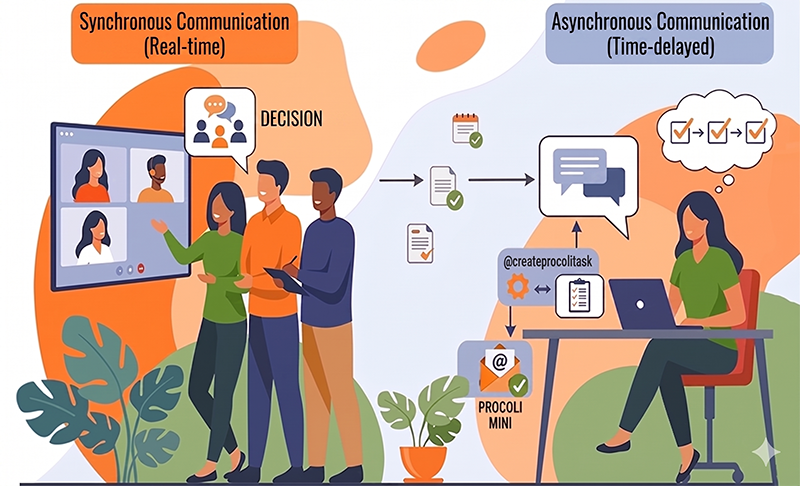
Synchronous communication happens simultaneously. Two or more communication partners speak in real time: face-to-face, in a video conference, on the phone, or via instant chat. You often expect an immediate reaction—that’s exactly what makes synchronous communication powerful but also risky.
Async communication happens on a time delay. You send a message, and your counterpart reads it and responds when it fits their schedule. Emails, project management tools, wiki documentation, text messages, and chats with clear expectations fall into this category. Async doesn't mean "slow"; it means "decoupled." You separate communication from the obligation to be present at the same time. Especially in international collaboration across time zones, this measurably reduces hurdles.
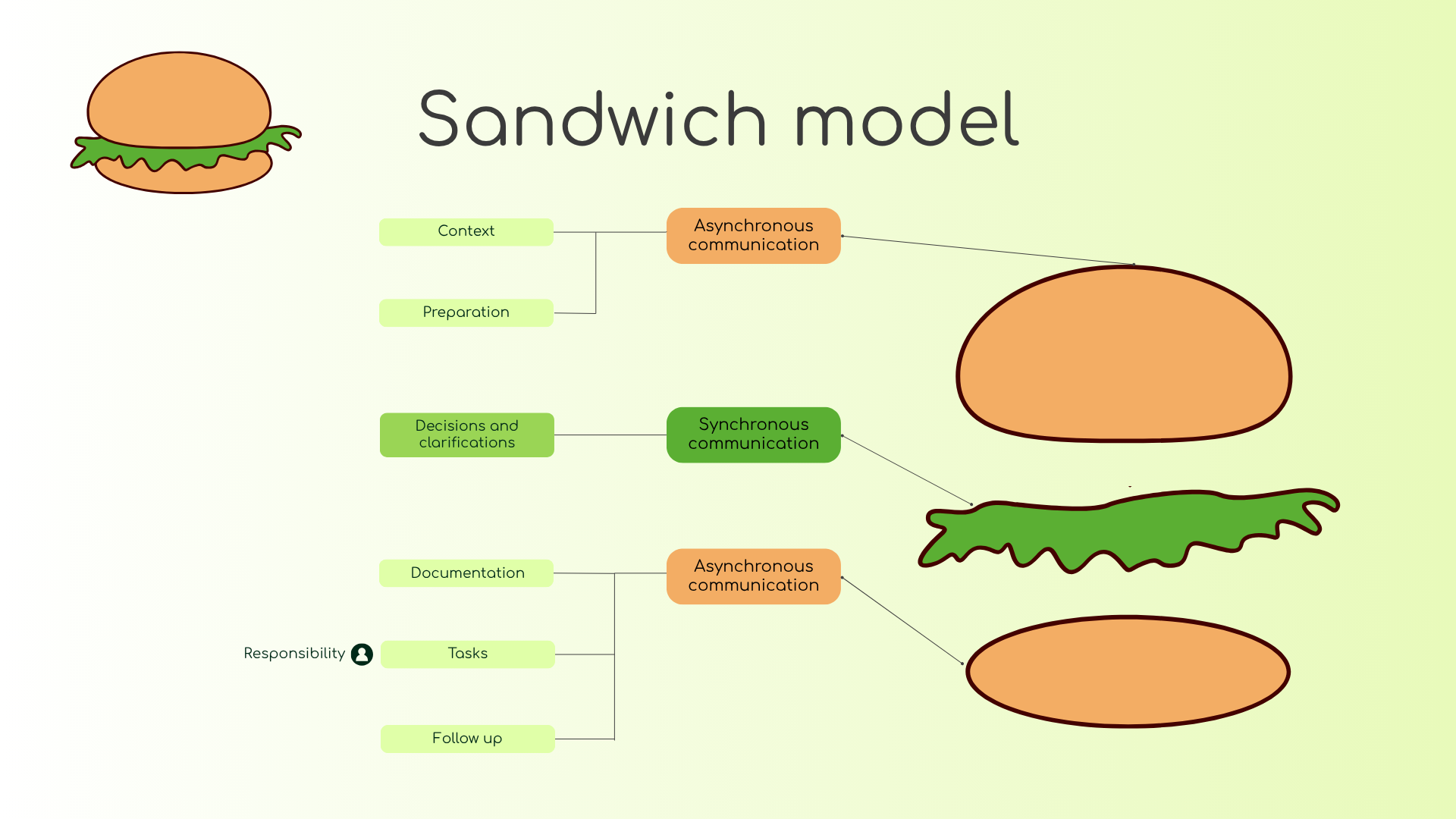
When you consciously combine both, you create a system that stays productive: synchronous communication for connection and decisions, and async communication for context, async status updates, handovers, and clean documentation. A sandwich method can help keep meetings as effective as possible: Async – Sync – Async.
Which type of communication fits which situation?
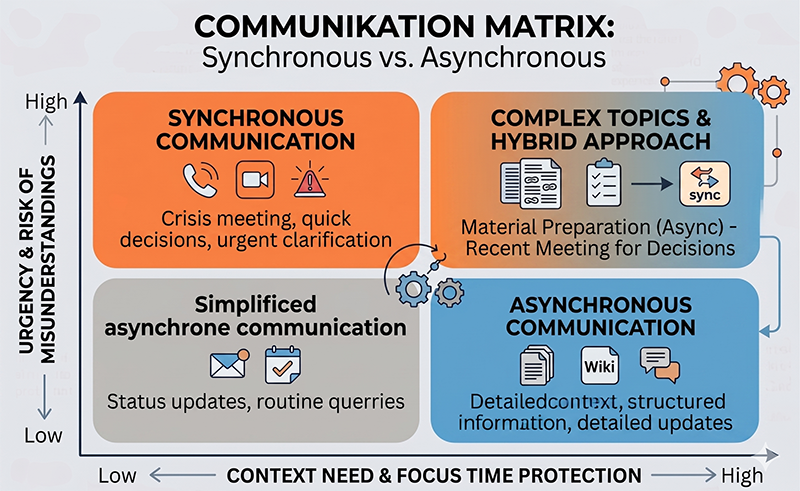
The most important question is: Does the situation require real-time interactivity, or is well-structured input enough? If you want to reach many people without needing a discussion, async is the right choice. If you are clarifying sensitive topics, resolving conflicts, or untangling many unknowns in a short time, synchronous is better.
Use a simple rule of thumb: The higher the urgency and the higher the risk of misunderstandings, the more likely synchronous communication fits. The more you want to protect focus time and the more context is needed, the more async communication is recommended. This helps you avoid meetings that exist solely to unload information.
Also, consider complexity: For complex topics, an async conversation often works better than a spontaneous meeting because it lets you prepare material, share links, provide examples, and gather structured questions beforehand. Then, you schedule a brief synchronous meeting to make the final decision.
Synchronous communication is best for:
- Conflict resolution
- Feedback
- Sensitive topics
- Workshops
- Brainstorming
- Kickoffs
You use video conferences or in-person meetings when you need high interactivity and immediate decisions.
Async communication is best for:
- Async status updates
- Documentation
- Handovers
- Reviews
- Approvals
- Training videos
- Tutorials, teaching, and learning in distributed teams
Here, you send text messages, links, short videos, and set clear deadlines instead of demanding immediate answers.
Why do too many meetings often feel like productivity killers – and what does async change?
Meetings quickly become blockers when they substitute missing context. You are pulled out of your focus time to listen to 30 minutes of updates, and at the end, it’s unclear who is doing what. This is exactly why many teams call having too many meetings a productivity killer: there is too much simultaneous communication and too few results.
One of the great advantages of async communication is that it flips this logic. You move status updates and context out of the meeting. Team members can read async updates anytime and anywhere, ask questions in a thread, and you use the next meeting strictly for decisions or genuine collaboration. If you want to reduce meetings increase productivity, this is the way to go—focus blocks remain intact. You can also use our Meeting Minutes Template to foster more structure and clear responsibilities in discussions.
Another lever: You separate "immediate response expected" from "response by tomorrow is fine." This reduces stress, sustainably improves availability, and stops the reflex to treat every message like an emergency fire alarm.
Which rules make async communication truly effortless?
Without rules, async communication ends up as an endless chat stream. Therefore, set standards that everyone understands:
Define response times based on urgency. Flag messages as "not urgent" or provide a deadline: "Reply by Thursday, 12:00 PM." This way, your counterpart knows whether an immediate answer is expected or not. This clarity reduces ping-ponging and stops unnecessary interruptions, easily leading to less meetings.
Additionally, always lead with context: Goal, decision, question, desired format. This is especially helpful in text messages since the tone of voice is missing compared to spoken conversations. Use short lists, format decisions in bold, and number your questions. This keeps communication clear in messaging channels.
And finally: Keep work visible. When information gets buried in chats, chaos ensues. You need a place where project information is permanently findable. Transfer tasks and outputs into your preferred project management tool. If you use procoli, you will soon be able to use the command @createprocolitask: Task X – Owner: Y – by: MM.DD directly in the chat to create a task without any manual copy-pasting.
Summary
- Define response times & urgencies
- Start with context
- Short lists > long text blocks
- Mark decisions in bold
- Number questions & answers
- Keep tasks & outputs visible
Which tools support async communication without creating tool chaos?
Tools only help if you select them by purpose. For async communication, you typically need three categories: Messaging, Knowledge Base, and Task/Project Management. Messaging covers quick updates and questions. The knowledge base holds decisions and documentation. Project management tools track tasks, responsibilities, and progress.
Many teams use Asana or Trello for tasks, plus chat tools for quick coordination. This works as long as you establish clear handovers: What happens in chat must also be created as a task or recorded in the documentation. If chat decisions aren't processed further, a thread gets blocked because nobody defines the next step.
Important: Too many tools create friction. Don't decide "which tool is the best," but define "which information belongs where." This system logic scales much better within a company than tool dogmatism. And if you are tired of mandatory tools and manual transferring, simply join our procoli waiting list and tell us about your biggest collaboration hurdles—we are working on boundaryless collaboration based on your needs.
How do you combine sync and async communication in projects (Playbook)?
A simple playbook that works for almost any use case helps here:
- Async before Sync: You send out context in advance, including a decision proposal. Everyone comments asynchronously.
- Sync for Decisions: You use a short meeting to resolve open points and make the final decision.
- Async after Sync: You document the decision, next steps, and responsibilities in a shared system or a brief, simple meeting protocol.
This creates a cycle of sync and async communication, preventing randomness. You reduce meeting time, increase clarity, and build a sustainable documentation trail.
This process perfectly matching hybrid working models: Nobody needs to be present at the exact same time to stay informed, yet human connection still happens when it really counts.
Time zones, availability, notifications: How do you reduce daily friction?
Time zones cause friction because simultaneous presence is no longer a given. Implement rotating meeting times so that the same region isn't always stuck with late-night calls. Furthermore, incorporate asynchronous prep work—for example, answering agenda questions in writing beforehand so you can decide faster in the meeting.
Make availability explicit. Use focus times, core hours & "Do not disturb" modes. Prevent notifications from wrecking your focus by filtering when you allow what. You achieve this by working in blocks and scheduling response windows. This keeps communication stable without you constantly having to switch to "instant mode."
A small, powerful standard: Write deadlines in UTC if you work internationally. This way, no one trips over daylight saving time changes, and everyone understands the timeframe unambiguously.
How do you use recordings, audio, and transcripts as a tool?
Many teams use recordings and transcripts as the "minutes." That’s exactly where problems start: a recorded meeting provides raw material, but not a clear result. You do not want a 12-page transcript as documentation, because this leaves room for interpretation rather than creating a clear framework and fixed responsibilities. The hallmark of good documentation is condensing information so that it's unambiguous.
Use a transcription as a support tool—for example, as a safety net, reference work, or safeguard for "who said what." Afterward, create a short summary with a clear structure: Key points, decisions, action items, and open questions. Always manually double-check content like names, responsible persons, and deadlines. This ensures quality remains high.
Audio notes and short screen recordings also work well: multimedia, fast, clear. Especially for explanations or tutorials, this is more effective than a lengthy message. Make sure to record the final result in writing so it can easily be retrieved later.
Tip
Use transcripts as a safety net, not as the final meeting minutes. Generate a short summary with key points, decisions, and action items from them—and always manually verify names, owners, and deadlines.
procoli: Integrate external partners via email link + @createprocolitask in chat
Here comes the reality check almost every team faces: Internal communication runs somewhat smoothly, but external communication collapses into email chaos. External partners use different tools, don't want accounts, and respond outside your core hours. That’s exactly where you need async communication that still remains structured.
This is where Procoli Mini steps in (coming soon): You integrate external partners via link-based collaboration directly through email, without any login. A civil engineer remodeling a house can assign tasks via link to companies handling the roof, doors, or electrical work. Partners receive automated notifications with a link to the task, discuss within the task, upload/download files, and give feedback in an interactive web view. Collaboration remains async but avoids chaos.
Long-term, procoli pursues the vision of "freedom over forced tools": All team members decide whether to stay in their own tool or work directly in procoli. procoli synchronizes your favorite tools, provides a central overview, and makes progress visible. Automation reduces repetitive tasks. And in everyday life, a simple workflow emerges: You write @createprocolitask in a chat or during a meeting, instantly creating a task in procoli—without manual entry. This is exactly how you connect synchronous communication during a meeting with asynchronous execution afterward.
Join the procoli waiting list to get an update as soon as you can use @createprocolitask.
At a Glance
- Use synchronous communication for real-time decisions, conflicts, sensitive topics, and workshops.
- Use async communication for statuses, contextual info, documentation, approvals, and handovers.
- Define response times so not every message implies an "immediate" reply, respecting colleagues' working hours.
- Reduce meetings where they are unnecessary. Use the sandwich model "Async before Sync" and "Async after Sync" to keep meetings effective and short.
- Actively plan for time zones: rotating times, UTC deadlines, and utilize async prep.
- Use transcripts as a supportive safety net, not as finalized meeting minutes.
- Keep decisions and tasks visible so chats don't become the only source of truth. Either transfer them manually or use an automation like procoli will offer.
- Integrate external partners in a structured way (use procoli Mini to do this without logins or forced tool adoption).
Q&A
What is async communication?
Async communication operates on a time delay. You send a message, and your counterpart reads and replies to it later. Emails, wikis, project management tools, and chat threads fall into this category.
What is synchronous communication?
Synchronous communication happens simultaneously in real time: Meetings, phone calls, video conferences, face-to-face discussions, or live chats with immediate reactions.
What are the advantages of async communication in a team?
Proper application of async communication allows for focus time, reduces meeting pressure, and simplifies documentation. Team members react during suitable time windows rather than being interrupted mid-task.
When should I use synchronous communication?
Sync communication is ideal when you need to make real-time decisions, resolve conflicts, discuss sensitive topics, or run creative workshops. The higher the urgency and the risk of misunderstanding, the more synchronous approaches make sense.
What is the sandwich model for meetings?
The sandwich model means: Async – Sync – Async. You send the context upfront asynchronously, run the synchronous meeting for decisions, and subsequently document the results and next steps asynchronously again. This keeps meetings short and results visible.
How many tools do I need for async communication?
Typically, three categories: Messaging, Knowledge Base, and Task/Project Management. Rather than constantly debating which tool is best, define what information belongs where. Too many tools just add friction.
How does @createprocolitask work?
You write @createprocolitask: Task X – Owner: Y – by: MM.DD in a chat or during a meeting, instantly generating a task inside procoli without extra admin work. It seamlessly links synchronous meeting outcomes with asynchronous task execution.